MessenPass - Recover your IM password!


Introducing MessenPass, this software enable you to recover the passwords that your forgotten by saved in your Instant messager. MessenPass is a password recovery tool that reveals the passwords of the following instant messenger applications:

* MSN Messenger
* Windows Messenger (In Windows XP)
* Windows Live Messenger (In Windows XP/Vista/7)
* Yahoo Messenger (Versions 5.x and 6.x)
* Google Talk
* ICQ Lite 4.x/5.x/2003
* AOL Instant Messenger v4.6 or below, AIM 6.x, and AIM Pro.
* Trillian
* Trillian Astra
* Miranda
* GAIM/Pidgin
* MySpace IM
* PaltalkScene
* Digsby

MessenPass can only be used to recover the passwords for the current logged-on user on your local computer, and it only works if you chose the remember your password in one of the above programs. You cannot use this utility for grabbing the passwords of other users.

This software is quite handy and able to be use to hack people account. Im not going to teach you how to do that. Just use your imagination.

Known Problems
False Alert Problems: Some Antivirus programs detect MessenPass utility as infected with Trojan/Virus. Click here to read more about false alerts in Antivirus programs

Download MessenPass in zip file (mspass.zip) Download self-install executable for installing MessenPass with uninstall support

Enjoy! Please click on my ads as token of appreciation. Thank you. 

MyUninstaller v1.70 - Alternative to the standard add / remove control panel module


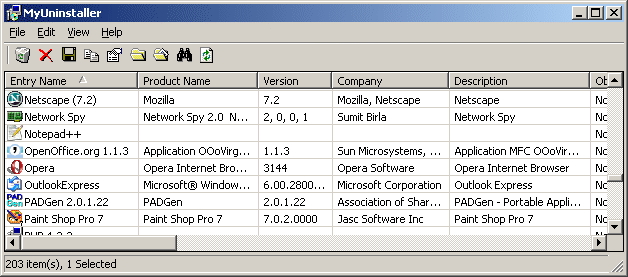
MyUninstaller is an alternative uninstaller utility to the standard Add/Remove applet of Windows operating system. It displays the list of all installed application, and allows you to uninstall an application, delete an uninstall entry, and save the list of all installed applications into a text file or HTML file.
MyUninstaller also provides additional information for most installed applications that the standard Add/Remove applet doesn't display: product name, company, version, uninstall string, installation folder and more.

System Requirements
This utility works on any version of Windows - from Windows 98 to Windows 7. You should log-in to the system as admin user, so the uninstall process will work properly.

Important Notice
When you uninstall a software, MyUninstaller utility is not directly responsible to the uninstall process. MyUninstaller simply run the uninstall module provided by the software that you want to uninstall. So, if from some reason the uninstall process fails, you should contact the author of the software that you want to uninstall, not to the author of MyUninstaller.

Download MyUninstaller - Add / Remove Alternative

Enjoy! Please click on my ads as token of appreciation. Thank you. 
 

eXtraButtons - Make your work more comfortable


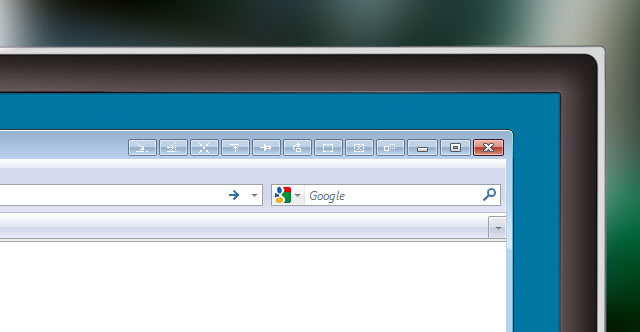
eXtraButtons is a freeware that enable you to put extra button to your windows so it will enhances and make your work more convenience. 

Features

  • Convenience and functionality

    It is very simple to get used to eXtra Buttons. There are so many useful functional features, that you won't even notice the change of the way you work with computer.
  • eXtra Buttons does not need special skills for use

    Using buttons as simple as using standard buttons "Minimize", "Maximize" and "Close".
  • eXtra Buttons is completely built into system

    You won't spot any look and feel difference with standard buttons while using eXtra Buttons. And because they are using native Windows' system functions, they will always appear according to your desktop theme.
  • eXtra Buttons is a tightly integrated solution

    eXtra Buttons works in all windows versions starting from Windows 98 and including the latest Windows 7
  • The set of buttons can be redefined at any moment

    eXtra Buttons represents following set of additional buttons:
    • Always on top — places window on the top of the other windows, so that be always visible whether or not it has the focus.
    • Send to back — places window under others, so it will not bother you.
    • Copy window — starts a copy of the application in the new window.
    • Roll-up/Unroll — minimizes window to its caption, so you can see only caption line with the title of the window.
    • Minimize to Box — minimizes window and places its icon on the Desktop in adjusted arrangement.
    • Transparency — makes the window transparent according to adjusted level. You may adjust any default transparency level.
    • Percentage transparency — makes the window transparent according to percents from pop-up Transparency Menu.
    • Minimize to Tray — minimizes window and places its icon to System Tray.
    • Minimize to Tray Menu — minimizes window and places its icon to System Tray Menu.
    You can always change quantity and sequence of buttons to use only what is necessary.
  • Applications blacklist

    Add application to the blacklist if you do not want eXtra Buttons to appear.
  • Hot-key for each of eXtra Buttons

    You may assign any valid keyboard and shift key (including <Alt> and <Ctrl>) combination for each of eXtra Buttons. Use of this combination will have the same result as clicking the button with a  mouse.
  • eXtra Buttons starts on system startup


DOWNLOAD

Enjoy! Please click on my ads as token of appreciation. Thank you. 

AniFX 1.0 - all-in-one solution for cursor creation


AniFX is a freeware cursor editor. It is an all-in-one solution for cursor creation, extraction and editing. It is designed to work with Windows XP, Windows Vista cursors supporting transparency.
With a wealth of tools and more than 40 effects at your fingertips, there’s virtually no limit to the cursors you can create. You can easily convert your favorite images into cursors, or cursors into images. AniFX gives you the possibility to change cursors inside exe files.
Convert your GIF files to animated cursors and vice versa. With AniFX you can extract cursors from other files, including Windows Vista and Macintosh files. You can easily work with multiple files using the batch processing capability of AniFX.


Main Features:

  • Create cursors for Windows 98 / ME / 2000 / XP / Vista
  • Support for animated (ANI) cursors
  • Create animated GIF files
  • Create cursor libraries
  • Easily convert images to cursors
  • Add, change or delete cursors inside exe files
  • Support for transparency (alpha channel)
  • Batch processing for import, export and extract
  • Multiple language support
  • More than 40 effects + custom filter
  • Resolutions up to 256x256
  • Data types: 2, 16, 256, True Color, True Color + Alpha
  • Extract cursors from 32 bit exe and dll
  • Import and export images
  • Transparent, Brighten/Darken, Blur/Sharpen tools
Free Download
 Enjoy! Please click on my ads as token of appreciation. Thank you.

IcoFX 1.6.4 - Award Winning Icon editor tool

IcoFX is an award winning freeware icon editor. It is an all-in-one solution for icon creation, extraction and editing. It is designed to work with Windows XP, Windows Vista, Windows 7 and Macintosh icons supporting transparency.

With a wealth of tools and more than 40 effects at your fingertips, there’s virtually no limit to the icons you can create. You can easily convert your favorite images into icons, or icons into images. IcoFX gives you the possibility to create icon libraries or change icons inside exe files. Create a favicon for your website or blog.
Convert your Macintosh icons to Windows icons and vice versa. With IcoFX you can extract icons from other files, including Windows Vista, Windows 7 and Macintosh files. You can easily work with multiple files using the batch processing capability of IcoFX.

Main Features
  • Support for Vista icon with PNG compression
  • Create icons for Windows 98 / ME / 2000 / XP / Vista
  • Support for Macintosh OS X icons
  • Convert Macintosh icons to Windows icons
  • Create icon libraries
  • Create favicon for websites or blogs
  • Easily convert images to icons
  • Add, change or delete icons inside exe files
  • Support for transparency (alpha channel)
  • Batch processing for import, export and extract
  • Multiple language support
  • More than 40 effects + custom filter
  • Resolutions up to 256x256
  • Data types: 2, 16, 256, True Color, True Color + Alpha
  • Extract icons from 32 bit exe and dll
  • Import and export images
  • Transparent, Brighten/Darken, Blur/Sharpen tools

Free Download

Enjoy! Please click on my ads as token of appreciation. Thank you.

Task Coach - Your friendly task manager

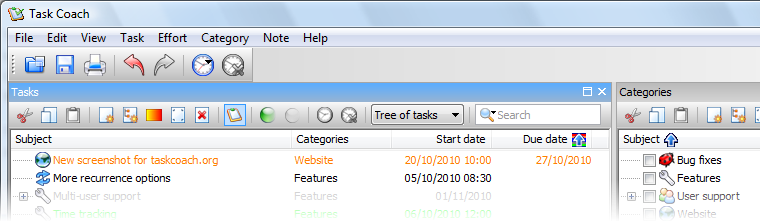
Task Coach is a simple open source todo manager to keep track of personal tasks and todo lists. It grew out of a frustration that most task managers do not provide facilities for composite tasks. Often, tasks and other things todo consist of several activities. Task Coach is designed to deal with composite tasks. In addition, it offers effort tracking, categories, and notes. Task Coach is available for Windows, Mac OS X, Linux, and iPhone and iPod Touch.


Task Coach currently (1.2.6) has the following features:
  • Creating, editing, and deleting tasks and subtasks.
  • Tasks have a subject, description, priority, start date, due date, a completion date and an optional reminder. Tasks can recur on a daily, weekly or monthly basis.
  • Tasks can be viewed as a list or as a tree.
  • Tasks can be sorted by all task attributes, e.g. subject, budget, budget left, due date, etc.
  • Several filters to e.g. hide completed tasks or view only tasks that are due today.
  • Tasks can be created by dragging an e-mail message from Outlook or Thunderbird onto a task viewer.
  • Attachments can be added to tasks, notes, and categories by dragging and dropping files, e-mail messages from Outlook or Thunderbird, or URL's onto a task, note or category.
  • Task status depends on its subtask and vice versa. E.g. if you mark the last uncompleted subtask as completed, the parent task is automatically marked as completed too.
  • Tasks and notes can be assigned to user-defined categories.
  • Settings are persistent and saved automatically. The last opened file is loaded automatically when starting Task Coach.
  • Tracking time spent on tasks. Tasks can have a budget. Time spent can be viewed by individual effort period, by day, by week, and by month.
  • The Task Coach file format (.tsk) is XML.
  • Tasks, notes, effort, and categories can be exported to HTML and CSV (Comma separated format). Effort can be exported to iCalendar/ICS format as well.
  • Tasks, effort, notes, and categories can be printed. When printing, Task Coach prints the information that is visible in the current view, including any filters and sort order.
  • Task Coach can be run from a removable medium.
  • Tasks and notes can be synchronized via a Funambol server such as ScheduleWorld. 

Download

Enjoy! Please click on my ads as token of appreciation. Thank you.

Notepad++

Notepad++ is a free (as in "free speech" and also as in "free beer") source code editor and Notepad replacement that supports several languages. Running in the MS Windows environment, its use is governed by GPL License.

Based on the powerful editing component Scintilla, Notepad++ is written in C++ and uses pure Win32 API and STL which ensures a higher execution speed and smaller program size. By optimizing as many routines as possible without losing user friendliness, Notepad++ is trying to reduce the world carbon dioxide emissions. When using less CPU power, the PC can throttle down and reduce power consumption, resulting in a greener environment.


Notepad++ Portable is a full-featured text editor with features like:
  • Syntax Highlighting and Syntax Folding (C, C++, HTML, ASP, Java, Pascal, CSS and more)
  • User Defined Syntax Highlighting
  • Auto-completion
  • Multi-Document
  • Regular Expression Search/Replace supported
  • Full Drag ‘N' Drop supported
  • Zoom in and zoom out
  • Multi-Language environment supported
  • Brace and Indent guideline Highlighting
  • Macro recording and playback

Download v5.8.6

Enjoy! Please click on my ads as token of appreciation. Thank you.
Related Posts Plugin for WordPress, Blogger...